Welcome to Agiloop INVENT
Agiloop INVENT is designed to help you move from ideas to execution-ready plans with clarity and confidence.
This tour walks through the core areas of the INVENT experience so you know where things live, how they work together, and how to get value quickly.
The Main Interface (Backlog & Planning View)
The main interface is where you spend most of your time planning and reviewing your project.
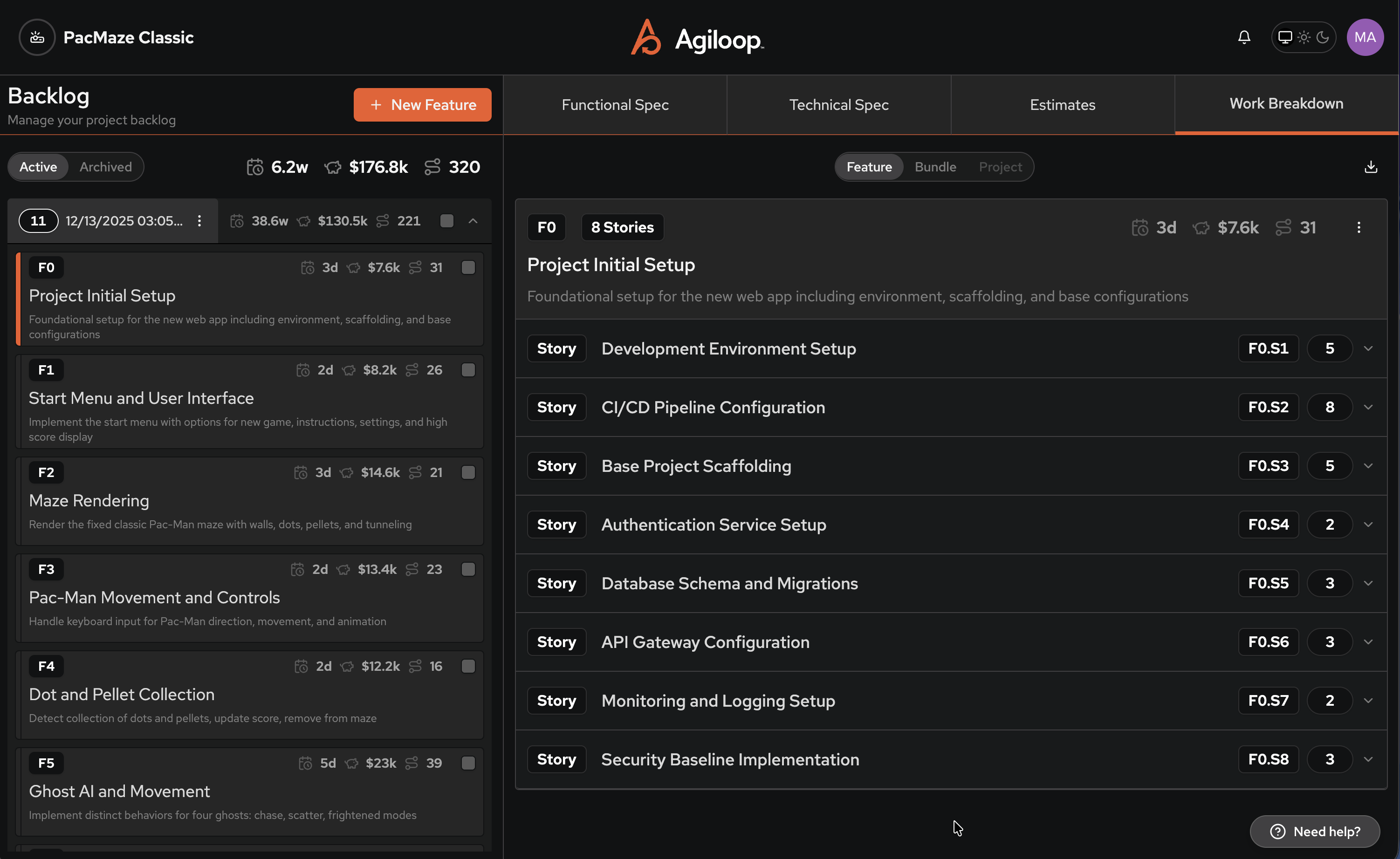
Project Backlog (Left Panel)
The left panel displays your feature backlog.
Here you can:
View all features in the project
See high-level rollups for time, cost, and effort
Switch between Active and Archived features
Quickly understand project scope at a glance
Each feature represents a meaningful unit of functionality, not just a task.
Primary Workspace (Right Panel)
The right panel shows details for the selected feature in the left panel.
This area displays:
Functional specifications
Technical specifications
Estimates
Work breakdowns (stories and tasks)
This makes it easy to move between high-level intent and execution-level detail without losing context.
Primary Workspace Selector
The workspace selector allows you to switch between Feature, Bundle or Project level content.
- Feature - you see the specifications for the selected feature only.
- Bundle - you see the compilation of the specifications for all features in the selected features bundle
- Project - you see the functional and technical specifications for the project
Navigation Tabs (Top)
Across the top of the interface are tabs that let you switch views:
Functional Spec – what the system should do
Technical Spec – how it should be built
Estimates – time, cost, and effort rollups
Work Breakdown – stories and implementation details
Agiloop Interview
The Agiloop Interview is where planning begins.
Instead of starting with a blank page, INVENT guides you through a structured discovery process.
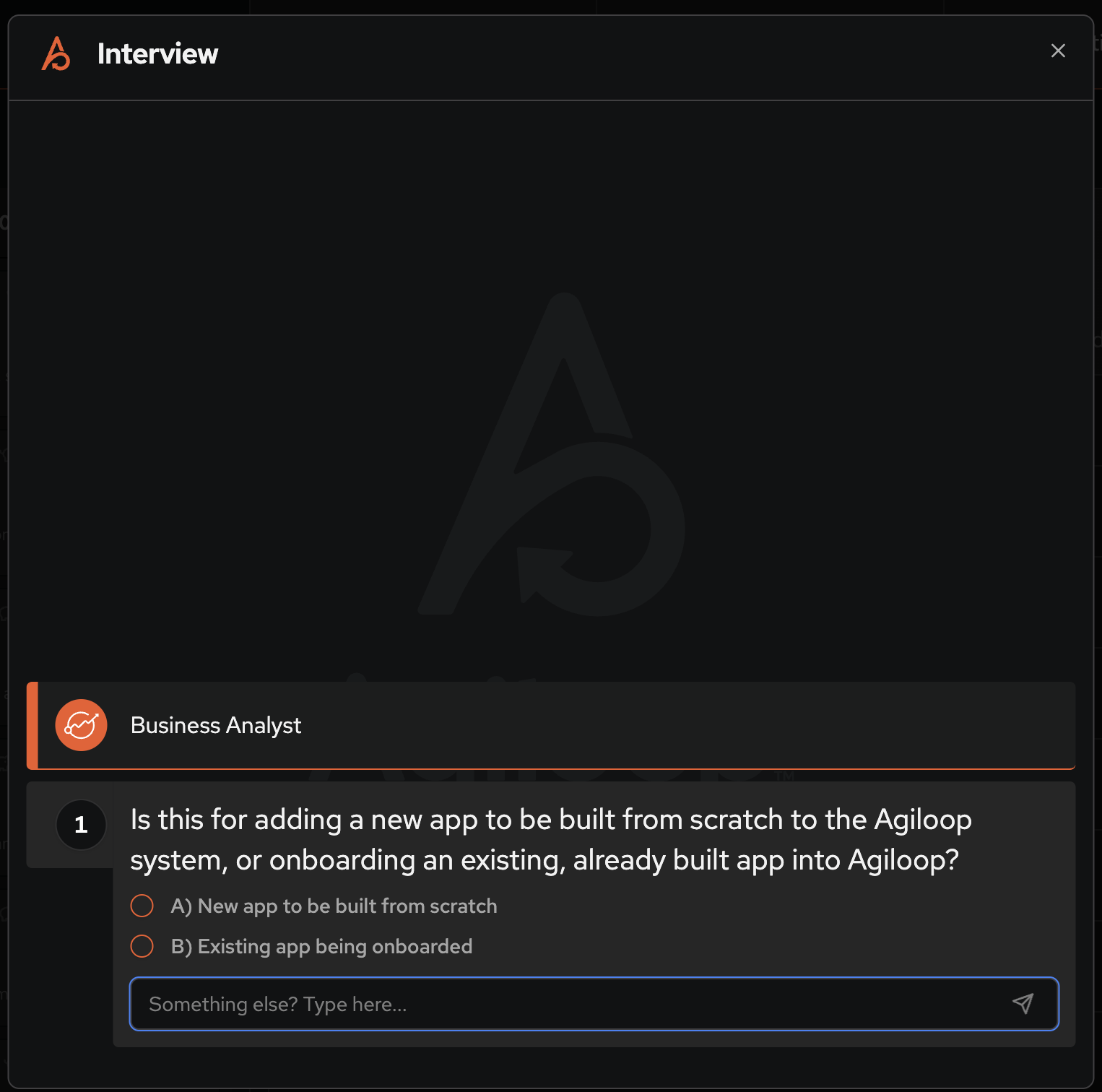
Guided, Persona-Driven Questions
Interview questions are asked by specialized AI personas, such as:
Business Analyst – focuses on goals, users, and value
Software Architect – focuses on architecture, integrations, and technical constraints
Questions adapt based on your answers, helping surface important details without overwhelming you.
Flexible Input
For each question, you can:
Choose from suggested options
Enter free-form responses
Provide additional context when needed
Your answers directly drive the features, stories, and specifications that INVENT generates.
What Interview Produces
When the Interview completes, INVENT automatically generates:
Feature Bundles
Features
Stories
Tasks
Initial estimates and specs
Everything remains editable — Interview is a starting point, not a locked decision.
Project Settings
Project Settings control how your project is named, managed, and integrated with other tools.
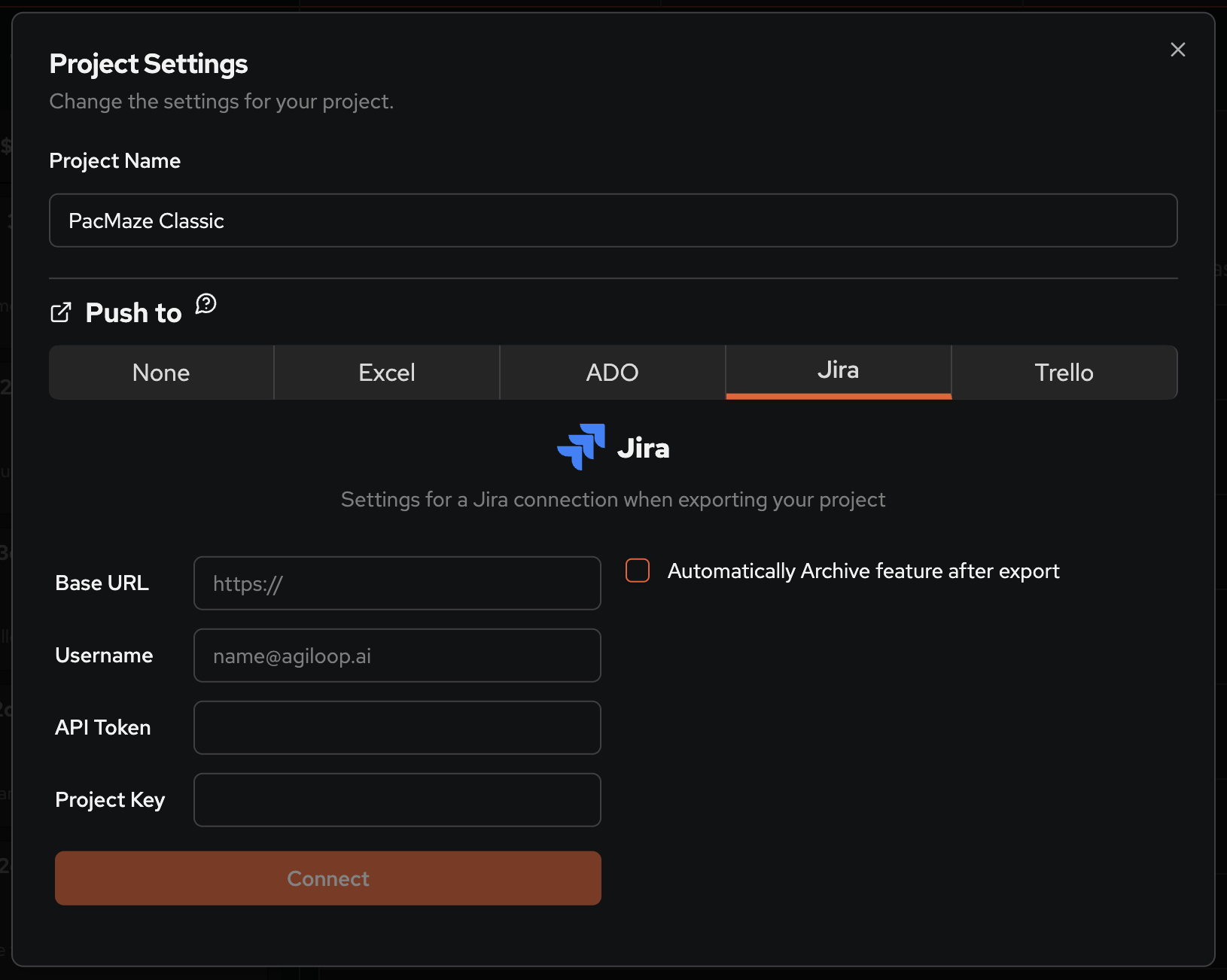
Project Details
At the top of Project Settings, you can:
Set or update the project name
Manage project-level configuration
These settings apply across all features and bundles in the project.
Push To (Export & Integrations)
The Push To section allows you to configure where INVENT sends work for execution.
Supported destinations include:
Jira
Azure DevOps
Trello
Excel
Each destination has its own configuration requirements.
Tool-Specific Configuration
When a tool is selected (for example, Jira), INVENT prompts you for:
Connection details (such as base URL and credentials)
Target project or board
Mapping between INVENT concepts and destination work items
This ensures exported items are created correctly and match your existing workflows.
Automatic Archiving (Optional)
You can optionally enable Automatically archive feature after export.
When enabled:
Features are archived in INVENT after being pushed
Archived features remain visible for reference
Archived features are excluded from active planning and estimates
This is useful when INVENT is used for planning and execution happens elsewhere.
How It All Works Together
Agiloop INVENT is designed around a simple flow:
Interview to discover requirements
Plan using features, bundles, and specs
Review scope, estimates, and work breakdowns
Push work into your execution tools
Each part of the interface supports this flow without forcing you into rigid processes.
Where to Go Next
If you’re new to INVENT, a great next step is:
Start an Interview to generate your first plan
Review features and bundles in the main interface
Configure Project Settings when you’re ready to push work into execution
Related Articles
What Is the Agiloop Interview?
What Is a Feature Bundle?
Reviewing Estimates in Agiloop INVENT
Pushing Features to Execution Tools
Was this article helpful?
That’s Great!
Thank you for your feedback
Sorry! We couldn't be helpful
Thank you for your feedback
Feedback sent
We appreciate your effort and will try to fix the article